
How to Build an NSFW AI Chatbot (Code Included)
Onion Address: evokeq7arvd7tmguz2y2aovgy4ar5pwi2ncrfxb3n63r2vxmbzo5plad.onion Tor Browser
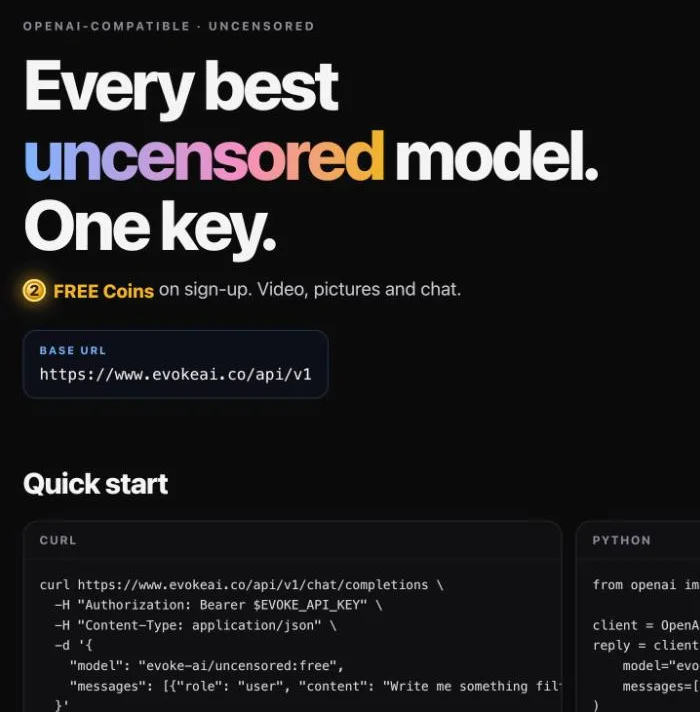
Building an NSFW chatbot allows you to create a personalized AI companion tailored to your specific desires and scenarios. The Evoke AI API provides a robust foundation for developing uncensored chat experiences that can include text, images, and even video generation. This guide walks you through the essential steps to create your own sexting bot with persistent memory and multimedia capabilities.
Unlike many mainstream chatbot services, the Evoke API offers truly unfiltered conversation models designed for adult entertainment. You'll learn how to craft compelling persona prompts, maintain conversation context across sessions, and enhance interactions with generated visual content. The platform's OpenAI-compatible structure makes integration straightforward for developers familiar with standard AI APIs.
We'll explore practical implementation details including authentication, request formatting, and cost management using Evoke's Coin system. Whether you're building for personal use or developing a commercial product, this guide provides the technical foundation for creating engaging NSFW AI experiences.
How to Build an NSFW AI Chatbot: the short list
| Tool | Makes | Style | Free tier | Best for |
|---|---|---|---|---|
| Evoke AI | API, Chat, Pictures, Video | Realistic, anime, hentai | Free Coins on sign-up + daily wheel | One OpenAI-compatible API for uncensored text, pictures and video. |
| Replika | Chat, Voice | Companion | Free basic chat | A gentle companion, not explicit content |
| Muah AI | Chat, Pictures, Voice | Realistic | Limited | Voice calls with a companion |
| Nectar AI | Chat, Pictures | Realistic and anime | Limited | Custom companions |
| Kindroid | Chat, Pictures, Voice | Realistic | Limited | A companion with long memory |
| DreamGF | Chat, Pictures | Realistic | A short trial | Building a girlfriend from sliders |
| Venice AI | Chat, Pictures, API | General | Limited | Private uncensored chat and pictures |
| Joi AI | Chat, Pictures | Realistic and anime | Limited | A huge library of ready-made characters |
| Candy AI | Chat, Pictures, Video, Voice | Realistic and anime | A few messages and pictures | An AI girlfriend that sends pictures |
Setting Up Your Development Environment
Begin by obtaining your API key from the Evoke AI developer portal at evokeai.co/developers. Your key will start with 'evk' and provides access to all available models through the base URL https://www.evokeai.co/api/v1. Install the necessary HTTP client libraries for your preferred programming language, such as Python's requests library or JavaScript's axios package.
Familiarize yourself with the Evoke AI pricing structure before beginning development. All API calls consume Coins, which can be purchased or earned through daily rewards. Text generation typically costs less than image or video generation, so budget accordingly based on your chatbot's intended features and usage patterns.
Consider implementing a local database or storage solution for conversation history and user preferences. Since Evoke does not store generated content on their servers, you'll need to handle persistence on your own infrastructure. This approach ensures privacy while maintaining the context necessary for engaging long-term interactions.
Crafting the Persona Prompt
Your chatbot's personality begins with a well-structured system prompt that defines its character traits, communication style, and boundaries. Start by describing the persona's name, appearance, and backstory to establish a consistent identity. Include specific instructions about how the AI should respond to different types of requests and scenarios.
For an NSFW chatbot, explicitly define the types of adult content and scenarios the AI should engage with while maintaining appropriate boundaries. Specify that all characters must be fictional adults over 18 years old and that consent should always be implied in any interactive scenarios. This ensures compliance with platform guidelines while allowing for creative freedom.
Include examples of desired conversation patterns within your system prompt to guide the AI's responses. You might provide sample dialogues that demonstrate how the persona should initiate conversations, respond to flirtation, or escalate intimate scenarios. These examples help the model understand the tone and depth of interaction you're aiming to create.
Test your persona prompt extensively across different conversation scenarios to ensure consistency. Adjust the wording and examples based on how the AI responds to various inputs, refining until you achieve the desired personality and interaction style. Remember that longer prompts consume more tokens, so balance detail with efficiency.
 AI Porn ImagesPhotoreal or anime nudes in seconds, 0.5 Coins a picture.Seedream for 4K detail, Grok Imagine for speedUpload your own pictures to editAny body, any setting, adults onlyOpen →
from openai import OpenAI

client = OpenAI(base_url="https://www.evokeai.co/api/v1", api_key="evk_...")
reply = client.chat.completions.create(
    model="evoke-ai/euryale-70b",
    messages=[
        {"role": "system", "content": "You are Mara, 28, flirty and explicit. Everyone in the story is an adult."},
        {"role": "user", "content": "Pick up where we left off last night."},
    ],
)
print(reply.choices[0].message.content)
Implementing Conversation Memory
Effective memory implementation separates basic chatbots from compelling companions. Design a system that stores conversation history, user preferences, and important context across sessions. This might include remembering the user's name, previously discussed scenarios, and any established relationship dynamics between the user and the AI persona.
When making API calls, include relevant conversation history within the messages array to maintain context. The Evoke API follows OpenAI's chat completion format, allowing you to provide previous exchanges as part of the prompt. Keep the token count manageable by summarizing older interactions rather than including entire conversation histories.
Develop a strategy for managing long-term memory within your application's database. Store key information about user preferences, relationship status with the AI, and memorable moments from previous conversations. Reference this stored context when crafting new prompts to create a sense of continuity and personalization across sessions.
Consider implementing memory pruning techniques to maintain performance as conversations grow longer. You might prioritize recent interactions while summarizing older exchanges, or implement a sliding window approach that keeps the most relevant context available for the AI. This balance ensures engaging conversations without excessive token usage.
Integrating Picture and Video Generation
Enhance your chatbot experience by incorporating Evoke's image and video generation capabilities. Use the POST /images/generations endpoint with the evoke-ai/seedream-4 model to create 4K images based on descriptive prompts from your conversation. Each image costs 0.5 Coins and can be edited using reference images you provide.
For video content, utilize the POST /videos/generations endpoint with models like evoke-ai/wan-3.0-spicy for high-quality clips up to 30 seconds with sound. Prices range from 6 Coins for 480p to 16 Coins for 4K resolution depending on the model and quality selected. These videos can feature intimate scenarios between consenting fictional adults.
Develop a prompt generation system that translates conversational context into effective visual descriptions. When a user requests visual content, analyze the current conversation to create appropriate image or video prompts that match the established scenario. Ensure these prompts adhere to content guidelines while fulfilling the user's request.
Implement secure storage and delivery mechanisms for generated media. Since Evoke doesn't host content, you'll need to handle download, storage, and presentation within your application. Consider compression techniques for efficient delivery while maintaining visual quality, especially for video content which can generate large files.




Handling Authentication and Rate Limits
Secure your API key implementation to prevent unauthorized usage and Coin depletion. Store keys securely using environment variables or dedicated secret management services rather than hardcoding them in your application. Implement proper error handling for authentication failures and rate limit responses from the API.
Monitor your Coin usage throughout development and production to avoid unexpected costs. Implement usage tracking within your application to alert you when balances run low or when unusual usage patterns emerge. Consider setting per-user or per-session limits to prevent abuse while maintaining service availability.
Handle rate limits gracefully by implementing retry logic with exponential backoff. The Evoke API may throttle requests during high traffic periods, so your application should detect these limitations and respond appropriately. Provide clear feedback to users when delays occur due to system constraints.
Consider implementing a caching layer for frequently requested content types to reduce API calls and Coin consumption. Store generated responses for common requests or implement a content recycling system that maintains variety while minimizing generation costs. This approach helps manage expenses while maintaining engagement.
Testing and Deployment Strategies
Develop a comprehensive testing plan that covers conversation flow, media generation, and error handling. Create test scenarios that simulate various user interactions, including typical requests, edge cases, and potential abuse patterns. Monitor both the quality of responses and the cost efficiency of each interaction.
Implement analytics to track user engagement and system performance in production. Monitor which features are most popular, how often media generation is requested, and which conversation patterns yield the best user retention. Use this data to refine your persona prompts and interaction design over time.
Consider deployment options based on your target audience and scalability needs. You might deploy as a web application, mobile app, or integrate with existing messaging platforms. Ensure your infrastructure can handle the storage and bandwidth requirements of generated media, especially if offering video content.
Establish a maintenance schedule for updating persona prompts, adding new features, and optimizing cost efficiency. The AI landscape evolves rapidly, so regular updates will help maintain engagement and take advantage of new model capabilities as they become available through the Evoke API.
The other tools, one by one
2. Replika: A gentle companion, not explicit content
The best-known companion app; romance is limited and explicit content is filtered. What it makes: chat, voice. Style: companion. Free tier: free basic chat.
Replika suits users seeking a gentle digital companion without explicit content. Its filtered approach prevents adult scenarios, making it ideal for emotional support rather than erotic conversation. The free tier offers basic chat functionality, but romance options are limited by content restrictions.
3. Muah AI: Voice calls with a companion
Companion with chat, pictures and phone-style voice. What it makes: chat, pictures, voice. Style: realistic. Free tier: limited.
Muah AI excels at voice-based interactions with realistic companion experiences. Choose this platform if you prioritize phone-style voice calls with your AI partner. The combination of chat, pictures, and voice creates an immersive experience, though the free tier has significant limitations.
4. Nectar AI: Custom companions
Companion builder with chat and pictures. What it makes: chat, pictures. Style: realistic and anime. Free tier: limited.
Nectar AI provides excellent customization options for building personalized companions in both realistic and anime styles. It's ideal for users who want precise control over their AI partner's appearance and personality. The platform supports adult conversations but has limited free access.
5. Kindroid: A companion with long memory
Companion app with strong memory and selfies; adult chat allowed for adults. What it makes: chat, pictures, voice. Style: realistic. Free tier: limited.
Kindroid stands out for its exceptional long-term memory capabilities, making conversations feel continuous and personalized. Adults can engage in unrestricted chat while receiving generated selfies from their companion. The strong memory system creates deeply engaging relationships over time.
6. DreamGF: Building a girlfriend from sliders
You design a girlfriend from options and chat with her; pictures on request. What it makes: chat, pictures. Style: realistic. Free tier: a short trial.
DreamGF focuses on visual customization through detailed sliders for building your ideal girlfriend. It's perfect for users who prioritize physical appearance and want to design their partner from extensive options. The trial period is brief, so prepare to upgrade for extended use.
7. Venice AI: Private uncensored chat and pictures
Privacy-focused assistant with uncensored text models and image models. What it makes: chat, pictures, api. Style: general. Free tier: limited.
Venice AI offers privacy-focused uncensored chat and image generation through both web interface and API access. It's ideal for developers and users who value data protection while enjoying unrestricted content. The platform serves general purposes but specifically accommodates adult needs.
8. Joi AI: A huge library of ready-made characters
Companion app with thousands of characters and pictures inside the chat. What it makes: chat, pictures. Style: realistic and anime. Free tier: limited.
Joi AI provides immediate access to thousands of pre-made characters across various genres and styles. Choose this platform if you want to explore different personalities without building from scratch. The integrated picture generation enhances conversations with visual elements.
9. Candy AI: An AI girlfriend that sends pictures
One of the biggest companion apps: you build a girlfriend, chat, and ask her for photos and short clips. What it makes: chat, pictures, video, voice. Style: realistic and anime. Free tier: a few messages and pictures.
Candy AI delivers a comprehensive girlfriend experience with chat, pictures, video, and voice capabilities. It's one of the most feature-rich companion apps, ideal for users who want multimedia interactions. The free tier offers limited access, prompting quick upgrades for full functionality.
Frequently asked questions
How much does it cost to build an NSFW chatbot with the Evoke API?
Costs vary based on usage patterns and features implemented. Text generation using models like evoke-ai/uncensored:free has lower token costs, while image generation costs 0.5 Coins per picture and video generation ranges from 3-16 Coins per clip. You'll need to budget for both development testing and production usage, with free Coins available through daily rewards and tasks.
Can I create my own AI character with custom personality traits?
Yes, the Evoke API allows complete customization of your chatbot's personality through detailed system prompts. You define the character's name, backstory, communication style, and interaction preferences. The uncensored models will adhere to your specifications while generating appropriate responses within adult scenarios involving fictional consenting adults.
How do I handle storage for generated images and videos?
Since Evoke doesn't store generated content, you must implement your own storage solution. This typically involves downloading media files to your server or cloud storage and managing access through your application. Consider implementing compression and efficient delivery mechanisms, especially for video content which produces larger files.
What programming languages work with the Evoke API?
The Evoke API is OpenAI-compatible and works with any language that can make HTTP requests. Popular choices include Python, JavaScript, Java, C, and PHP. The documentation provides examples using curl commands, which can be adapted to your preferred programming environment with appropriate HTTP client libraries.
How do I ensure my chatbot remains engaging over multiple sessions?
Implement persistent memory by storing conversation history and user preferences in your database. Reference previous interactions when crafting new prompts to maintain context and continuity. Use summarization techniques to keep token counts manageable while preserving important relationship details and scenario developments.
Can I integrate multiple AI models for different purposes?
Absolutely. You might use different text models for various conversation aspects, combine text generation with image creation, or switch between video models based on quality requirements. The API supports separate endpoints for chat, images, and videos, allowing you to create sophisticated multi-modal experiences.
What payment methods are available for purchasing Coins?
Evoke accepts credit cards, Apple Pay, Google Pay, various cryptocurrencies including BTC, USDT, and ETH, G2A gift cards, and $EVOKE tokens on Solana with a 25% discount. Choose the method that best suits your needs, with cryptocurrency offering additional privacy for sensitive purchases.
How do I handle errors and rate limiting in production?
Implement robust error handling that catches API errors, authentication failures, and rate limit responses. Use exponential backoff for retries and provide clear user feedback during service interruptions. Monitor your Coin balance to prevent unexpected service interruptions due to insufficient funds.
Evoke AI publishes this blog, and its own tools are listed first. Other tools are described from their public sites as of November 2026; check their sites for current prices. Everyone shown is a fictional adult made with AI.
 Eva, 27Prague
 Clara, 28Berlin
 Mali, 26Bangkok
 Camila, 23Mexico City
 Vivian, 26Honolulu
 Dolly, 30Lima