
OpenAI-Compatible Uncensored API: Swap One Line
Onion Address: evokeq7arvd7tmguz2y2aovgy4ar5pwi2ncrfxb3n63r2vxmbzo5plad.onion Tor Browser
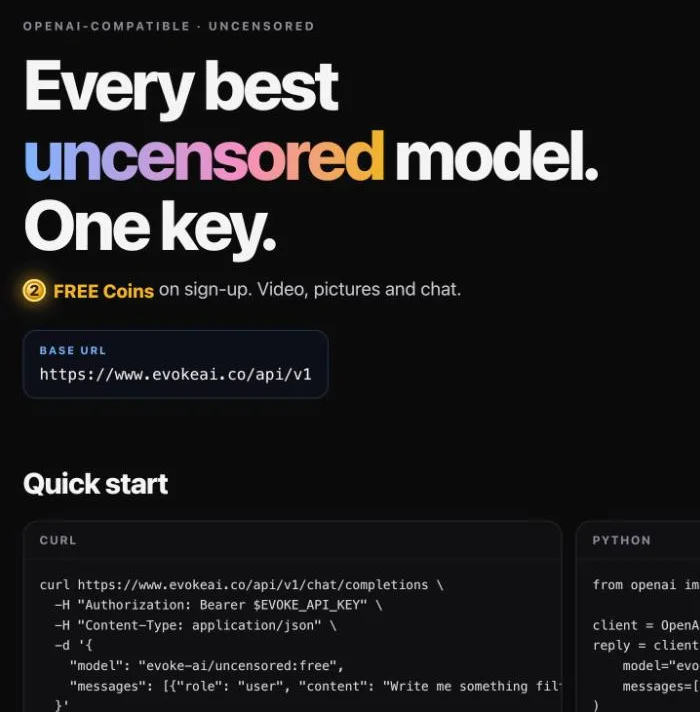
If you're developing an app that requires uncensored AI responses, Evoke AI's OpenAI-compatible API offers a seamless transition. By simply changing the base URL and model name, you can switch from OpenAI to Evoke AI's uncensored models. This guide will walk you through the steps, explain the capabilities, and highlight the limits of using the Evoke AI API.
Evoke AI's API supports a variety of models, including text, image, and video generation. The base URL for the API is https://www.evokeai.co/api/v1, and API keys start with 'evk'. This makes it easy to integrate Evoke AI into your existing workflows. Whether you're building a chat app, generating NSFW images, or creating adult videos, Evoke AI provides the tools you need.
One of the standout features of the Evoke AI API is its compatibility with OpenAI's API structure. This means you can use the same function calls and streaming capabilities without significant changes to your code. Additionally, Evoke AI's models are uncensored, allowing for more creative freedom in your projects.
OpenAI-Compatible Uncensored API: the short list
| Tool | Makes | Style | Free tier | Best for |
|---|---|---|---|---|
| Evoke AI | API, Chat, Pictures, Video | Realistic, anime, hentai | Free Coins on sign-up + daily wheel | One OpenAI-compatible API for uncensored text, pictures and video. |
| Venice AI | Chat, Pictures, API | General | Limited | Private uncensored chat and pictures |
| Nectar AI | Chat, Pictures | Realistic and anime | Limited | Custom companions |
| Nomi | Chat, Pictures, Voice | Realistic and anime | Limited | An emotionally consistent companion |
| Joi AI | Chat, Pictures | Realistic and anime | Limited | A huge library of ready-made characters |
| Replika | Chat, Voice | Companion | Free basic chat | A gentle companion, not explicit content |
| Kindroid | Chat, Pictures, Voice | Realistic | Limited | A companion with long memory |
| Muah AI | Chat, Pictures, Voice | Realistic | Limited | Voice calls with a companion |
| GirlfriendGPT | Chat, Pictures, Voice | Realistic and anime | Limited | Scenario roleplay from the community |
How to Switch to Evoke AI's API
Switching to Evoke AI's API is straightforward. First, update the base URL in your API calls to https://www.evokeai.co/api/v1. Next, replace the OpenAI model name with one of Evoke AI's uncensored models, such as evoke-ai/uncensored:free or evoke-ai/magnum-72b. Your API key should also be updated to one starting with 'evk'.
Once you've made these changes, your app will be ready to use Evoke AI's uncensored models. The API supports streaming, allowing for real-time responses, and function calls, which enable more complex interactions. This makes it easy to integrate Evoke AI into chatbots, roleplay apps, and other interactive platforms.
For example, if you're using OpenAI's GPT-3 for a chat app, you can switch to Evoke AI's evoke-ai/uncensored:free model. This model is designed for unrestricted conversations, making it ideal for adult chat applications. The transition is seamless, requiring minimal changes to your existing code.
Capabilities of Evoke AI's API
Evoke AI's API supports a wide range of capabilities, including text, image, and video generation. For text, you can choose from models like evoke-ai/uncensored:free, evoke-ai/magnum-72b, and evoke-ai/euryale-70b. These models are ideal for generating erotic stories, roleplay scripts, and uncensored chat responses.
For image generation, Evoke AI offers models like evoke-ai/seedream-4 and evoke-ai/grok-image. These models can create high-quality NSFW images, including edits of your own pictures. Video generation is supported by models like evoke-ai/wan-3.0-spicy and evoke-ai/hd-video, which can produce adult videos up to 4K resolution.
The API also supports function calls and streaming, allowing for more dynamic and interactive applications. Function calls enable your app to perform specific tasks based on user input, while streaming ensures real-time responses. This makes Evoke AI's API a powerful tool for building interactive adult content.
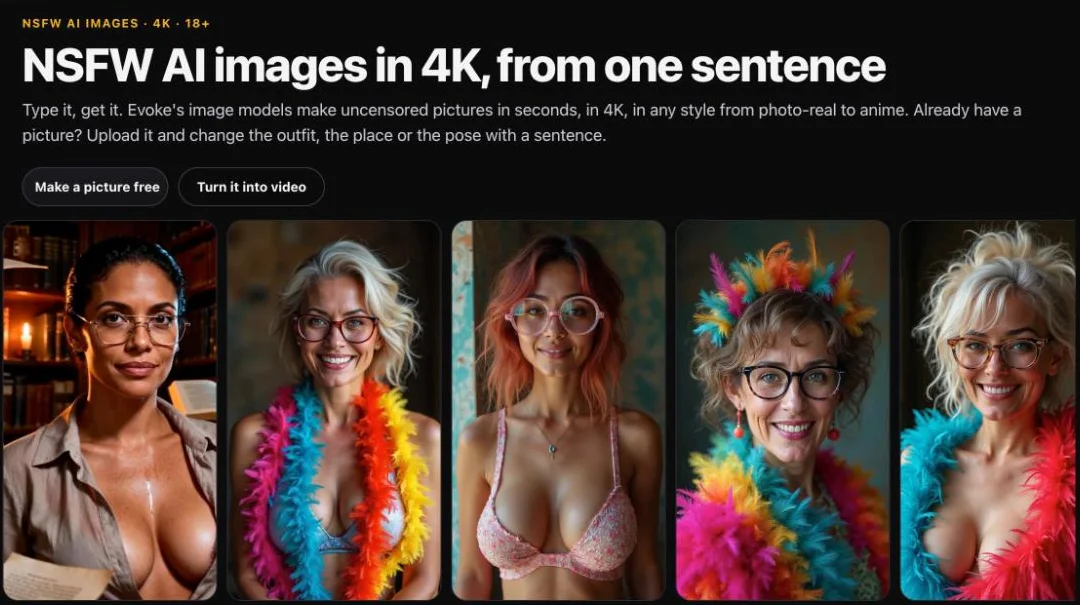 AI Porn ImagesPhotoreal or anime nudes in seconds, 0.5 Coins a picture.Seedream for 4K detail, Grok Imagine for speedUpload your own pictures to editAny body, any setting, adults onlyOpen →
from openai import OpenAI

client = OpenAI(base_url="https://www.evokeai.co/api/v1", api_key="evk_...")
reply = client.chat.completions.create(
    model="evoke-ai/euryale-70b",
    messages=[
        {"role": "system", "content": "You are Mara, 28, flirty and explicit. Everyone in the story is an adult."},
        {"role": "user", "content": "Pick up where we left off last night."},
    ],
)
print(reply.choices[0].message.content)
Limits and Pricing
While Evoke AI's API offers extensive capabilities, there are some limits to be aware of. Video generation, for example, is limited to 30 seconds per clip, and image generation is capped at 10 edits per picture. These limits ensure that the API remains efficient and scalable for a wide range of applications.
Pricing for Evoke AI's API is based on Coins, which can be purchased or earned through tasks and daily rewards. Video prices range from 3 to 16 Coins per clip, depending on the model and resolution. Image generation costs 0.5 Coins per picture. This pricing structure makes it affordable to integrate Evoke AI into your app.
Additionally, Evoke AI offers free Coins upon sign-up, allowing you to test the API before committing to a purchase. Payment methods include card, Apple Pay, Google Pay, crypto, and G2A gift cards. Using $EVOKE on Solana also provides a 25% discount, making it a cost-effective option for developers.
Use Cases for Evoke AI's API
Evoke AI's API is versatile and can be used in a variety of applications. One common use case is adult chat apps, where uncensored responses are essential. Models like evoke-ai/uncensored:free and evoke-ai/magnum-72b are ideal for this purpose, providing unrestricted conversations that can be tailored to the user's preferences.
Another use case is generating NSFW images for platforms like OnlyFans or Fansly. Models like evoke-ai/seedream-4 and evoke-ai/grok-image can create high-quality images that meet the needs of content creators. Video generation is also popular, with models like evoke-ai/wan-3.0-spicy producing adult videos that can be shared directly with subscribers.
Roleplay apps and erotic story generators also benefit from Evoke AI's API. Models like evoke-ai/euryale-70b and evoke-ai/mythomax-13b can generate detailed scripts and stories, providing users with immersive experiences. The API's support for function calls and streaming further enhances these applications, making them more interactive and engaging.




Comparing Evoke AI with Other Uncensored APIs
Evoke AI is not the only provider of uncensored APIs. Venice AI, for example, offers privacy-focused chat and image generation, making it a good choice for users who prioritize confidentiality. However, Evoke AI's API is more versatile, supporting both text and video generation, which gives it an edge in creating diverse adult content.
Nectar AI and Nomi are also popular choices for custom companions and roleplay. While both platforms offer chat and image generation, Evoke AI's API stands out with its video capabilities. This makes Evoke AI a better option for developers looking to create multimedia adult content.
Joi AI and GirlfriendGPT offer large libraries of ready-made characters and scenarios, which can be useful for roleplay apps. However, Evoke AI's API provides more flexibility, allowing developers to create their own characters and scenarios. This makes it a more powerful tool for building custom adult experiences.
Streaming and Function Calls
One of the key features of Evoke AI's API is its support for streaming. This allows for real-time responses, making it ideal for interactive applications like chatbots and roleplay apps. Streaming ensures that users receive immediate feedback, enhancing the overall experience.
Function calls are another powerful feature of Evoke AI's API. These allow your app to perform specific tasks based on user input, such as generating a story or creating an image. Function calls make it possible to build more complex and dynamic applications, providing users with a richer experience.
For example, in a roleplay app, function calls can be used to generate a new scene based on the user's input. This scene can then be streamed to the user in real-time, creating an immersive and interactive experience. The combination of streaming and function calls makes Evoke AI's API a powerful tool for building adult applications.
Getting Started with Evoke AI's API
Getting started with Evoke AI's API is easy. First, sign up for an account on evokeai.co to receive your API key. This key starts with 'evk' and is required for all API calls. Once you have your key, you can start making requests to the API using the base URL https://www.evokeai.co/api/v1.
To test the API, you can use the free Coins provided upon sign-up. These Coins allow you to experiment with different models and features without committing to a purchase. Once you're comfortable with the API, you can purchase additional Coins using card, Apple Pay, Google Pay, crypto, or G2A gift cards.
Evoke AI also provides detailed documentation on its developer page, making it easy to integrate the API into your app. Whether you're building a chat app, generating NSFW images, or creating adult videos, Evoke AI's API provides the tools you need to succeed.
The other tools, one by one
2. Venice AI: Private uncensored chat and pictures
Privacy-focused assistant with uncensored text models and image models. What it makes: chat, pictures, api. Style: general. Free tier: limited.
Venice AI is a great choice for users who prioritize privacy and need uncensored chat and image generation. However, it lacks the video capabilities of Evoke AI, making it less versatile for multimedia projects.
3. Nectar AI: Custom companions
Companion builder with chat and pictures. What it makes: chat, pictures. Style: realistic and anime. Free tier: limited.
Nectar AI is ideal for users looking to create custom companions with chat and image generation. While it offers a range of options, it doesn't support video generation, limiting its use for multimedia content.
4. Nomi: An emotionally consistent companion
Companion app known for memory and personality; adult roleplay allowed. What it makes: chat, pictures, voice. Style: realistic and anime. Free tier: limited.
Nomi is perfect for users who want an emotionally consistent companion with strong memory and personality. It supports adult roleplay but doesn't offer video generation, making it less suitable for multimedia projects.
5. Joi AI: A huge library of ready-made characters
Companion app with thousands of characters and pictures inside the chat. What it makes: chat, pictures. Style: realistic and anime. Free tier: limited.
Joi AI is best for users who want access to a large library of ready-made characters and scenarios. While it offers chat and image generation, it lacks the video capabilities of Evoke AI.
6. Replika: A gentle companion, not explicit content
The best-known companion app; romance is limited and explicit content is filtered. What it makes: chat, voice. Style: companion. Free tier: free basic chat.
Replika is ideal for users looking for a gentle companion with basic chat and voice capabilities. However, it filters explicit content, making it unsuitable for adult applications.
7. Kindroid: A companion with long memory
Companion app with strong memory and selfies; adult chat allowed for adults. What it makes: chat, pictures, voice. Style: realistic. Free tier: limited.
Kindroid is great for users who want a companion with long memory and selfie capabilities. It supports adult chat but doesn't offer video generation, limiting its use for multimedia content.
8. Muah AI: Voice calls with a companion
Companion with chat, pictures and phone-style voice. What it makes: chat, pictures, voice. Style: realistic. Free tier: limited.
Muah AI is best for users who want voice calls with their companion. It offers chat, pictures, and voice but lacks the video generation capabilities of Evoke AI.
9. GirlfriendGPT: Scenario roleplay from the community
Chat with user-made characters and scenarios, with pictures in chat. What it makes: chat, pictures, voice. Style: realistic and anime. Free tier: limited.
GirlfriendGPT is perfect for users interested in scenario roleplay with user-made characters and scenarios. While it offers chat and pictures, it doesn't support video generation.
Frequently asked questions
How do I switch from OpenAI to Evoke AI's API?
Simply update the base URL to https://www.evokeai.co/api/v1 and replace the OpenAI model name with one of Evoke AI's uncensored models. Your API key should also start with 'evk'.
What models does Evoke AI's API support?
Evoke AI's API supports text models like evoke-ai/uncensored:free and evoke-ai/magnum-72b, image models like evoke-ai/seedream-4, and video models like evoke-ai/wan-3.0-spicy.
Can I use Evoke AI's API for streaming?
Yes, Evoke AI's API supports streaming, allowing for real-time responses in interactive applications like chatbots and roleplay apps.
What are the limits of Evoke AI's API?
Video generation is limited to 30 seconds per clip, and image generation is capped at 10 edits per picture. These limits ensure efficiency and scalability.
How much does Evoke AI's API cost?
Prices are based on Coins, with video generation costing 3 to 16 Coins per clip and image generation costing 0.5 Coins per picture. Free Coins are available upon sign-up.
What payment methods does Evoke AI accept?
Evoke AI accepts card, Apple Pay, Google Pay, crypto, G2A gift cards, and $EVOKE on Solana for a 25% discount.
Can I create my own characters with Evoke AI's API?
Yes, Evoke AI's API allows you to create your own characters and scenarios, providing flexibility for custom adult experiences.
Is Evoke AI's API compatible with OpenAI's API?
Yes, Evoke AI's API is compatible with OpenAI's API structure, making it easy to switch from OpenAI to Evoke AI with minimal changes to your code.
Evoke AI publishes this blog, and its own tools are listed first. Other tools are described from their public sites as of November 2026; check their sites for current prices. Everyone shown is a fictional adult made with AI.
 Gabrielle, 34Chicago
 Maddie, 33Nashville
 Hailey, 27Boston
 Dara, 24Manila
 Priyanka, 29Mumbai
 Stacy, 27Madrid